

Have you ever wanted to create a cinematic AI image inspired by the larger-than-life style associated with Prabhas? With the latest AI image generation capabilities available through ChatGPT, it’s now possible to create dramatic, movie-style portraits using only a well-written prompt. Whether you’re a fan creating artwork for personal enjoyment, a digital artist exploring new ideas, or a content creator looking for eye-catching visuals, ChatGPT can help you generate stunning cinematic images in minutes. In this guide, you’ll learn how to create cinematic Prabhas AI images using ChatGPT, how to write an effective prompt, and tips to achieve realistic, high-quality results.
What Is a Cinematic AI Image?
A cinematic AI image is a highly detailed artwork designed to resemble the visual style of a movie scene. These images typically include:
- Dramatic lighting
- Professional camera composition
- Realistic facial details
- High-quality textures
- Movie-poster aesthetics
- Premium color grading
The quality of the result depends largely on how clearly your prompt describes the scene.
Why Use ChatGPT for AI Image Prompts?
ChatGPT helps you write detailed prompts that AI image models can understand more effectively. Instead of using short descriptions, you can specify:
- Clothing and styling
- Pose
- Lighting
- Background
- Camera angle
- Mood
- Quality settings
The more descriptive your prompt, the more cinematic the final image can look.
Sample Cinematic AI Prompt
Here’s an example of a prompt you can use to generate a stylish cinematic portrait:
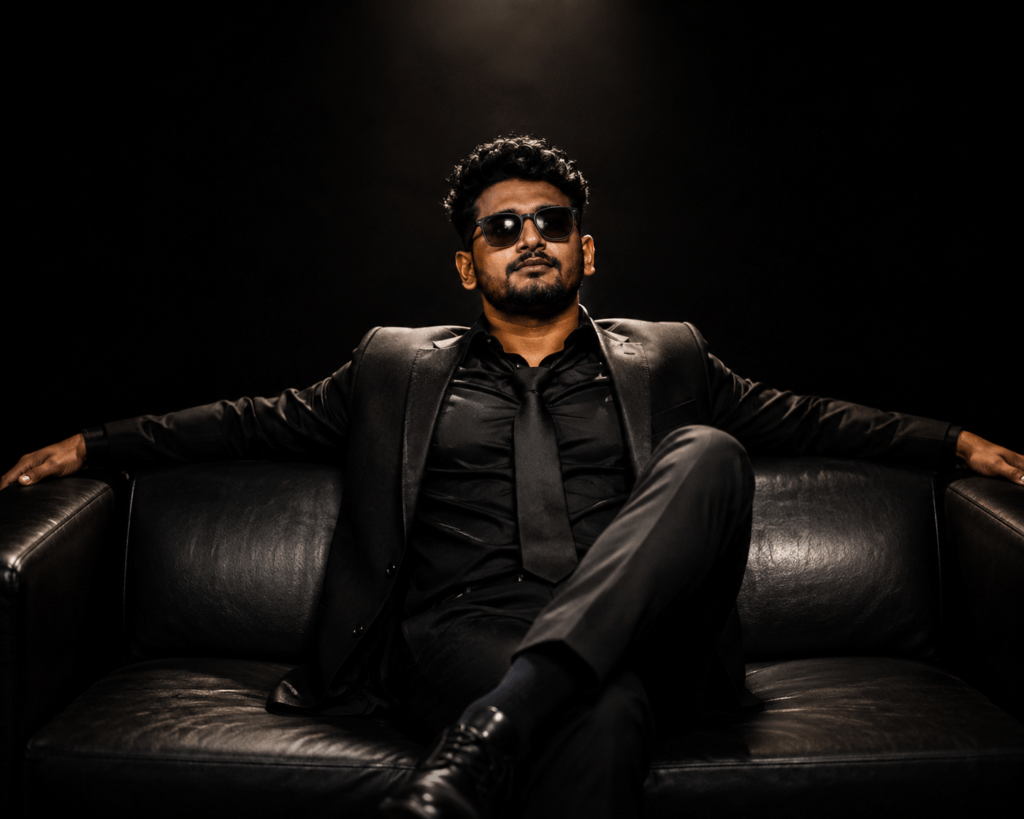
An ultra-realistic cinematic portrait of a stylish young Indian man sitting confidently on a luxurious black leather sofa in a dark studio. He wears a perfectly tailored black suit with a black shirt and loosely tied black tie, along with premium black sunglasses. His arms are stretched across the back of the sofa, one leg crossed over the other, giving a powerful and relaxed boss-like attitude. Soft cinematic spotlight from above creates dramatic highlights on his face and suit while the background remains completely black. Rich shadows, high contrast, luxury fashion editorial style, ultra-detailed skin texture, realistic fabric details, premium studio photography, shallow depth of field, symmetrical composition, 8K, HDR, sharp focus, movie poster quality.
This prompt focuses on cinematic styling rather than trying to reproduce a specific person’s appearance.
How to Generate the Image
Follow these simple steps:
- Open ChatGPT.
- Start a conversation that supports image generation.
- Paste your detailed prompt.
- Generate the image.
- Review the result and refine the prompt if needed.
- Adjust lighting, clothing, pose, or background until you get the look you want.
Tips for Better Cinematic Results
Use Detailed Descriptions
Instead of saying:
“Man sitting.”
Describe the full scene:
- Black suit
- Luxury leather sofa
- Dramatic spotlight
- Dark studio
- Movie-poster quality
Detailed prompts help the AI create more realistic results.
Specify Lighting
Lighting creates the cinematic feel.
Examples:
- Soft spotlight
- Golden hour lighting
- Moody studio lighting
- Blue cinematic lighting
- Dramatic rim light
Mention Camera Style
Include phrases like:
- Shallow depth of field
- Professional photography
- Symmetrical composition
- Low-angle shot
- 85mm portrait lens
- High contrast
These details improve realism.
Best Prompt Keywords
Adding descriptive keywords can significantly improve image quality.
Examples include:
- Ultra realistic
- Cinematic
- Hyper detailed
- HDR
- 8K
- Sharp focus
- Movie poster
- Premium studio photography
- Realistic skin texture
- Dramatic lighting
- Luxury fashion
- Volumetric lighting
Common Mistakes to Avoid
- Using very short prompts.
- Forgetting lighting details.
- Not describing the background.
- Mixing too many different styles.
- Leaving out clothing or camera composition.
A clean, focused prompt usually produces better results.
Can You Customize the Scene?
Yes. You can modify the prompt to create different cinematic settings, such as:
- Royal palace
- Futuristic city
- Desert landscape
- Snow-covered mountains
- Ancient temple
- Battle-ready warrior
- Luxury office
- Private jet
- Sports car
- Rain-soaked city streets
Changing the environment gives each image a unique look while keeping the cinematic style.
Frequently Asked Questions
Can ChatGPT create cinematic AI image prompts?
Yes. ChatGPT can help you write detailed prompts that are suitable for AI image generation.
Do I need editing skills?
No. A well-written prompt is often enough to produce high-quality AI artwork.
Can I change the outfit and background?
Absolutely. You can customize the clothing, environment, lighting, pose, and mood to match your creative vision.
What makes an image look cinematic?
Elements such as dramatic lighting, realistic textures, strong composition, and professional color grading contribute to a cinematic appearance.
Creating cinematic AI artwork has become much easier thanks to ChatGPT and modern image-generation tools. By writing clear, detailed prompts, you can produce visually striking portraits with professional lighting, realistic textures, and movie-inspired compositions. Experiment with different settings, camera angles, and environments to create original artwork that reflects your own creative ideas. With practice and thoughtful prompt writing, you can consistently generate stunning cinematic AI images in just a few minutes.